
Find Total Time Spent by Each Employee
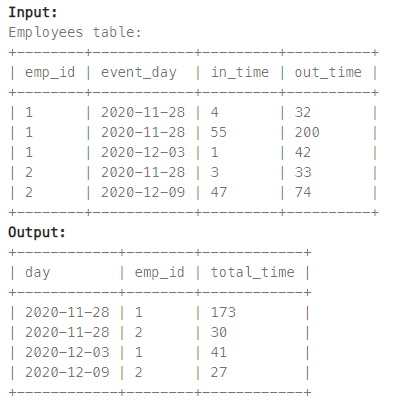
다음 테이블에서 개별 직원이 매일 사무실에서 보낸 총 시간을 분 단위로 계산하시오. (단, 하루 이내에 직원이 두 번 이상 출입할 수 있으며, 한 번의 출입으로 사무실에서 보낸 시간은 out_time - in_time 으로 계산할 수 있다.)
python
Employees['time'] = Employees['out_time'] - Employees['in_time']
print(Employees.groupby(['event_day','emp_id']).sum('time')['time'].reset_index())
- time 파생변수를 만들고, group by를 사용해서 날짜, id별 시간을 sum으로 집계
SQL
select date(event_day) as day, emp_id, sum(out_time - in_time) as total_time
from Employees
group by day, emp_id
- event_day에서 날짜만을 출력하기 위해 date 함수 사용
- 집계 함수 sum으로 시간을 구하고, group by로 날짜, id별로 집계
Game Play Analysis I
다음 테이블에서 개별 플레이어가 처음 로그인한 날짜를 구하시오.

python
print(Activity.groupby('player_id').min()[['event_date']].reset_index())
SQL
select player_id, date(min(event_date)) as first_login
from Activity
group by player_id
Number of Unique Subjects Taught by Each Teacher
다음 테이블에서 각 교수가 대학에서 가르치는 고유 과목의 수를 계산하시오.

python
print(Teacher.groupby('teacher_id')['subject_id'].nunique().reset_index())
- nunique() : 그룹 내에서 고유한 column의 개수를 계산
SQL
select teacher_id, count(distinct subject_id) as cnt
from Teacher
group by teacher_id
- distinct : 쿼리 결과에서 중복된 레코드를 제거할 때 사용
'코딩 테스트 > 30 Days of Pandas' 카테고리의 다른 글
| [9일차] python&sql (0) | 2023.08.25 |
|---|---|
| [8일차] python&sql (0) | 2023.08.24 |
| [6일차] python&sql (0) | 2023.08.22 |
| [5일차] python&sql (0) | 2023.08.21 |
| [4일차] python&sql (0) | 2023.08.20 |
