
최근 게임 업데이트 반응 분석 프로젝트를 수행했다. 이번 포스팅에서는 프로젝트에서 사용했던 API를 소개하고, 향후 활용을 위해 정리한 내용을 공유하고자 한다.
GCP(Google Cloud Platform)

GCP는 구글이 제공하는 클라우드 컴퓨팅 서비스로, 다양한 클라우드 기반 솔루션을 제공한다. VM(가상 머신),
Bigquery(SQL), VPC(네트워킹) 등 여러가지 API 서비스를 제공하여, 기업과 개발자가 더 빠르고 효율적으로 분석/운영 할 수 있도록 돕는다.
많은 기능들 중, 업데이트 관련 유튜브 댓글을 가져오기 위해 YouTube Data API v3 라는 API를 활용했다. 추가적인 기능이 궁금하신 분들은 아래의 공식 docs를 참고하시면 된다. 단, GCP는 기본적으로 유료 서비스이다. 신규 사용자에게는 3개월 간 무료 체험판을 제공하니, 혹시 기능이 궁금하신 분들은 체험판을 사용해보시는걸 추천드린다. 구글 계정만 있으면 누구나 사용할 수 있다는 편리함도 있다.
YouTube 개발자 문서 | Google for Developers
이 페이지는 Cloud Translation API를 통해 번역되었습니다. YouTube 개발자 문서 컬렉션을 사용해 정리하기 내 환경설정을 기준으로 콘텐츠를 저장하고 분류하세요. YouTube에는 YouTube 기능을 자체 웹사
developers.google.com
from googleapiclient.discovery import build
import pandas as pd
import re
import unicodedata
from datetime import datetime
import requests
from bs4 import BeautifulSoup

search_query = "검색어를 입력하세요."
base_url = f"https://www.youtube.com/results?search_query={search_query}&sp=CAMSAggE"
response = requests.get(base_url, headers={'User-Agent': 'Mozilla/5.0'})
response_text = response.text

# 정규표현식으로 해당 패턴 찾기
pattern = r'https://i.ytimg.com/vi/([^/]+)/'
matches = re.findall(pattern, response_text)

extract_ids = []

if matches:
    video_ids = matches
    for video_id in video_ids:
        extract_ids.append(video_id)
else:
    print("해당 패턴을 찾을 수 없습니다.")

extract_ids = set(extract_ids)
print(extract_ids)

class YouTubeCommentAnalyzer:
    def __init__(self, api_key):
        self.youtube = build('youtube', 'v3', developerKey=api_key)

    def get_comments(self, video_ids):
        comments = []
        for video_id in video_ids:
            response = self.youtube.commentThreads().list(
                part='snippet,replies',
                videoId=video_id,
                maxResults=100
            ).execute()
            while response:
                for item in response['items']:
                    comment = item['snippet']['topLevelComment']['snippet']
                    comments.append([comment['textDisplay'], comment['authorDisplayName'], comment['publishedAt'], comment['likeCount']])
                    if item['snippet']['totalReplyCount'] > 0:
                        for reply_item in item['replies']['comments']:
                            reply = reply_item['snippet']
                            comments.append([reply['textDisplay'], reply['authorDisplayName'], reply['publishedAt'], reply['likeCount']])
                if 'nextPageToken' in response:
                    response = self.youtube.commentThreads().list(
                        part='snippet,replies',
                        videoId=video_id,
                        pageToken=response['nextPageToken'],
                        maxResults=100
                    ).execute()
                else:
                    break
        df = pd.DataFrame(comments, columns=['text', 'author', 'date', 'likes'])
        return df

    def remove_emojis(self, text):
        return ''.join(c for c in text if not unicodedata.category(c).startswith('So'))

    def preprocess_comments(self, df):
        df['preprocessed_text'] = df['text'].apply(lambda x: re.sub(r'https?://[\w/:%#\$&\?\(\)~\.=\+\-]+', '', x))  # URL 제거
        df['preprocessed_text'] = df['preprocessed_text'].apply(lambda x: re.sub(r'[^가-힣\s]', '', x))  # 한글과 공백 이외의 모든 문자 제거
        df['preprocessed_text'] = df['preprocessed_text'].apply(lambda x: re.sub(r'@(\w+)', '', x))  # 멘션 제거
        df['preprocessed_text'] = df['preprocessed_text'].apply(lambda x: re.sub(r'\d+', '', x))  # 숫자 제거
        df['preprocessed_text'] = df['preprocessed_text'].apply(lambda x: re.sub(r'\r', '', x))  # 줄바꿈 태그 제거
        df['preprocessed_text'] = df['preprocessed_text'].apply(self.remove_emojis)  # 이모지 제거

        # date 열 형식 변경
        df['date'] = df['date'].apply(lambda x: datetime.strptime(x, '%Y-%m-%dT%H:%M:%SZ').strftime('%Y-%m-%d %H:00'))

        return df

api_key = ''
analyzer = YouTubeCommentAnalyzer(api_key)

df = analyzer.get_comments(video_id)
df = analyzer.preprocess_comments(df)
df = df.dropna()
df.head()
해당 Class는 Youtube에 특정 검색어를 입력하면, 그 검색어와 관련된 영상들에서 일괄적으로 댓글을 크롤링한 후 DataFrame으로 Return 하는 Code이다. Youtube 영상은 모두 고유한 videoid를 가지고 있는데, API에 videoid를 input 시키면 output으로 일시, 작성자, 좋아요 수, 댓글이 출력된다. 간단한 전처리를 거친 후, 텍스트 마이닝 및 시각화를 진행했다. 프로젝트에 대한 내용은 별도로 자세히 포스팅 할 예정이다.
Naver Cloud Platform
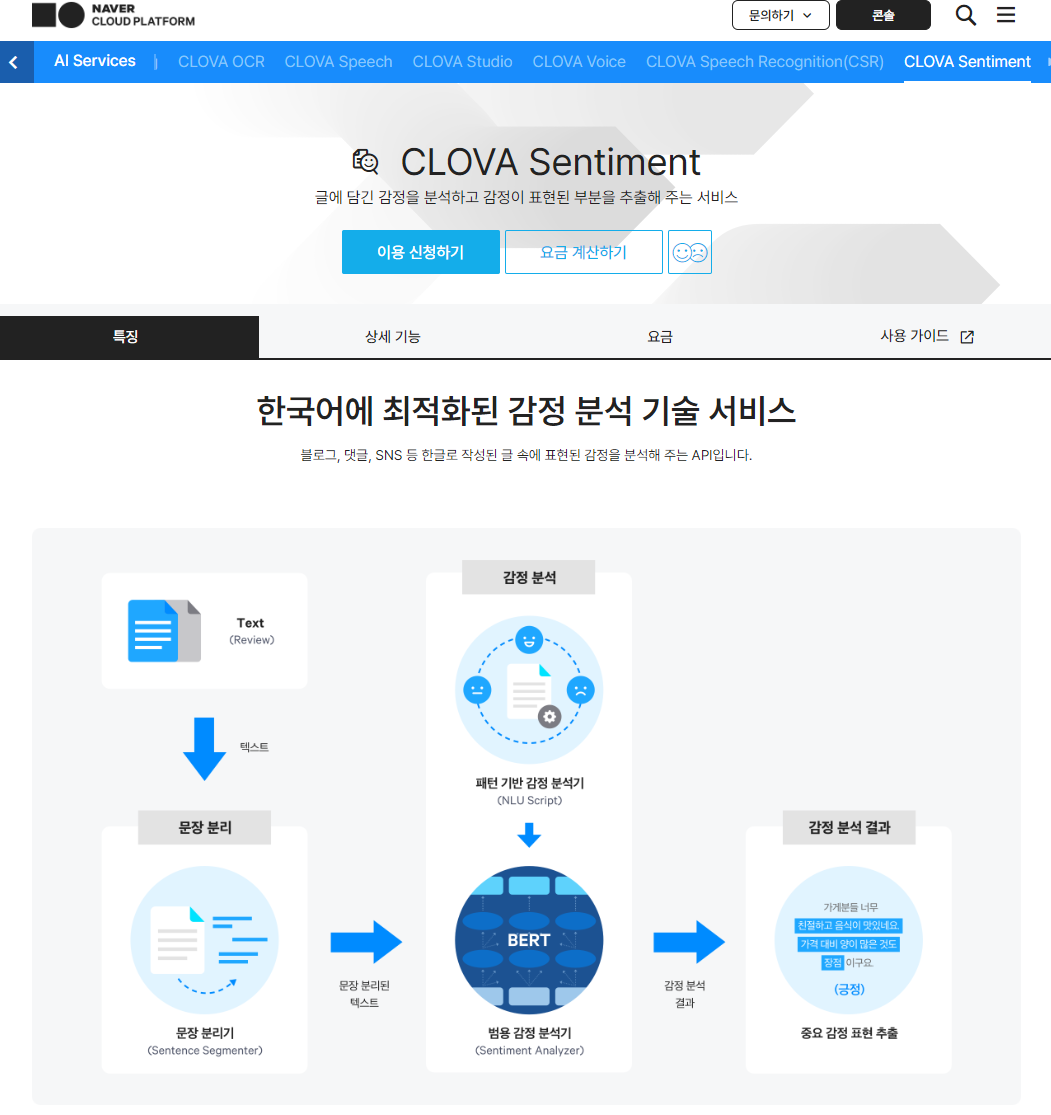
추출한 텍스트로 KNU 감성사전을 활용, 감성 분석을 진행했으나 결과가 좋지않았다. 방법을 탐색하던 중, 네이버 클라우드에서 감성 분석 API를 제공함을 확인했다. 네이버 블로그를 기반으로, 대량의 한국어 corpus를 학습시킨 CLOVA가 보다 정확한 결과를 출력할 것이라 예상하고, 해당 API로 감성분석을 진행했다. 네이버 클라우드도 GCP 못지않게 많은 API 서비스를 제공한다. 자세한 사항은 공식 Docs를 참고하길 바란다.
NAVER CLOUD PLATFORM
cloud computing services for corporations, IaaS, PaaS, SaaS, with Global region and Security Technology Certification
www.ncloud.com
def analyze_sentiment(text, client_id, client_secret):
    url = "https://naveropenapi.apigw.ntruss.com/sentiment-analysis/v1/analyze"
    headers = {
        "X-NCP-APIGW-API-KEY-ID": client_id,
        "X-NCP-APIGW-API-KEY": client_secret,
        "Content-Type": "application/json"
    }
    data = {"content": text, "config": {"negativeClassification": True} }
    response = requests.post(url, json=data, headers=headers)
    if response.status_code == 200:
        result = json.loads(response.text)
        sentiment_summary = {
            "document_sentiment": result["document"]["sentiment"],
            "confidence": result["document"]["confidence"],
            "sentence_details": []
        }
        for sentence in result["sentences"]:
            sentiment_summary["sentence_details"].append({
                "content": sentence["content"],
                "sentiment": sentence["sentiment"],
                "confidence": sentence["confidence"]
            })
            if sentence["sentiment"] == "negative":
                sentiment_summary["sentence_details"][-1]["negativeSentiment"] = sentence.get("negativeSentiment", {})
        return sentiment_summary
    else:
        return "Error"

# 데이터 프레임의 'preprocessed_text' 열에 대해 감성 분석 수행
sentiment_analysis = []
for text in tqdm(merge_df['preprocessed_text'], desc="Analyzing sentiments"):
    analysis_result = analyze_sentiment(text, client_id, client_secret)  # 변수 이름 변경
    sentiment_analysis.append(analysis_result)

# 결과 확인
for analysis in sentiment_analysis:
    print(analysis)
특히, CLOVA Sentiment는 개별 문장의 감성이 부정적이라면, 세부 감정 정보를 함께 제공한다. 단순히 부정적이다만 판별하는 것이 아니라, 세부적으로 어떤 감정인지를 파악하고 이를 제품/서비스 개선에 반영할 수 있다는 장점도 존재한다. 또한, 월 1,000건의 문장까지는 무료로 서비스를 제공한다. 직접 감성 분석을 해보고, LLM의 감성 분석과의 결과를 비교해봐도 좋을듯하다. 1,000회를 초과하면 건당 1원의 요금이 발생하니, 이 점은 주의하기 바란다.
바른(Bareun)

앞의 2가지 방법에 비해, 바른 형태소 분석기는 다소 생소할 수 있다. 바른 형태소 분석기를 사용하기 이전, 한국어 말뭉치를 분석할 때 konlpy의 mecab, okt를 주로 사용했다. 하지만, konlpy는 의미없는 결과 혹은 부정확한 결과가 출력되는 경우가 종종 있었고, 이를 해결하고자 방법을 찾던 중 바른 형태소 분석기를 발견했다. 무료로 다운받을 수 있고, Docs도 정리가 잘 되어있으니 한국어 말뭉치를 분석해야하면 해당 분석기를 사용해보는걸 추천드린다. 단점이 있다면, 로컬 서버에 API로 가져와서 웹으로 배포하는 데는 어려움이 존재한다.
바른
최고 성능의 한국어 형태소 분석기「바른」을 무료로 사용해 보세요.
bareun.ai
def tokenizer(data, api_key):
    # Tagger 인스턴스 생성 및 사용자 정의 사전 설정
    t = brn.Tagger(api_key, "localhost", 5656)
    cust_dic = t.custom_dict("my_dict_01")
    # 고유명사 사전
    cust_dic.copy_np_set({'캐릭터', '비질란테', '박종민', '강정호', '윤명진', '네오플', '헌터'})
    cust_dic.update()
    t.set_domain("my_dict_01")

    # 불용어 로딩 (이 과정은 함수 외부에서 한 번만 수행되어야 합니다)
    stopwords = load_stopwords()

    tags = t.tags(data)
    nouns = tags.nouns()

    # 불용어 제거 및 단어 길이 필터링
    filtered_nouns = [word for word in nouns if word not in stopwords and len(word) >= 2]

    # 단어 빈도수 계산 및 DataFrame 변환
    count_tokens = Counter(filtered_nouns)
    df_tokens = pd.DataFrame(count_tokens.items(), columns=['word', 'count'])
    df_tokens = df_tokens[df_tokens['count'] >= 10].sort_values('count', ascending=False).reset_index(drop=True)

    return df_tokens
가입 이후, Key만 있으면 Local에서 Python으로 분석하면 된다. 또한, OOV(Out-Of-Vocabulary)문제를 해결하기 위해 자체적으로 고유명사 사전을 제작할 수 있다. 이번 프로젝트에서는 디렉터 및 주요 직원분들의 성함과 직업명, 회사명을 간단하게 삽입했다. 이처럼 특정 도메인에 특화된 고유명사를 추가하면 해당 텍스트에 대한 분석을 더욱 정교하게 할 수 있다.
데이터를 가져와 불용어를 제거하고, tags 메소드로 POS(Part-Of-Speech)를 부착했다. 전체 데이터에서 명사가 고유한 의미를 가지고 있기 때문에 문서의 주제를 대표할 수 있다고 생각했다. 따라서, 명사만을 가져온 후 두 글자 이상의 데이터를 분석에 활용하였다.
이번 포스팅에서는 프로젝트에서 활용한 3가지 API를 간단하게 소개하고, 어떻게 Python으로 구현하였는지 정리하였다. 다음 포스팅에서는 프로젝트 전체를 리뷰해서 왜 분석을 진행했고, 어떻게 전체적인 흐름을 구성했는지 정리해보자.
'Aivle > Project' 카테고리의 다른 글
| [빅프로젝트] 네이버 뉴스 웹크롤링 (2) | 2024.07.11 |
|---|---|
| [에이블스쿨] 구글 플레이 스토어 리뷰 분석 (0) | 2024.05.19 |
| [에이블스쿨] 잡코리아 웹크롤링 (2) | 2024.03.21 |
| [에이블스쿨] RFM, Retention (0) | 2024.03.12 |
| [에이블스쿨] Python에서 WorkBench 연결 (0) | 2024.03.10 |
